
Y888 Game Deposit – Add Money to Your Account
If you already have a Y888 account and want to add money, you can use the Y888 Game Deposit section available in your account. The process is made for mobile users and can usually be completed in a few simple steps.
Before adding any money, check the payment options shown in your account. The available methods, minimum deposit, fees, and processing time can change, so it is better to read the details on the deposit screen first.
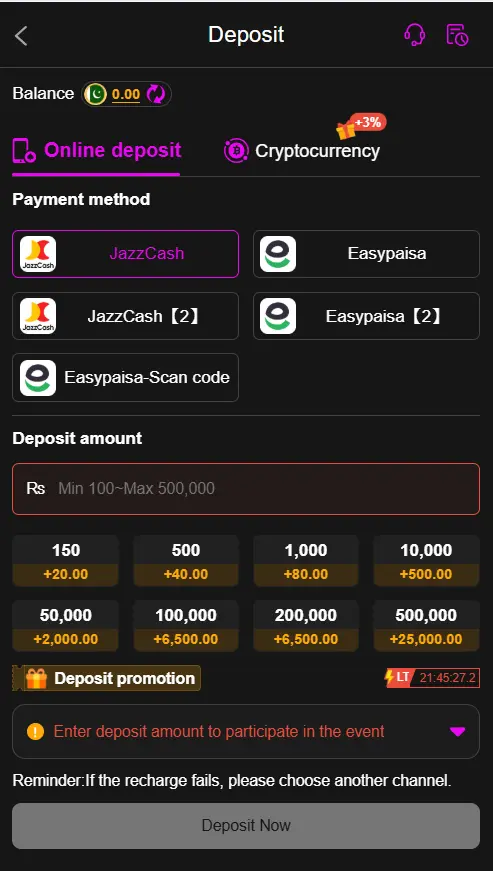
How to Deposit Money on Y888?
Adding funds to your Y888 account is a simple process. Follow the instructions below:
- Log in to your Y 888 account. Open the Y888 Game website or app and enter the login details linked to your account.
- Open the wallet or deposit section. Once you are inside your account, look for options such as Wallet, Deposit, Add Money, or a similar button.
- Select a payment method. Choose one of the payment options currently available to you. Pakistani users may see options such as JazzCash, EasyPaisa, bank transfer, or other supported methods.
- Enter the amount. Type the amount you want to deposit. Check the minimum and maximum limits shown on the page before continuing.
- Add the required payment information. Follow the instructions provided for your selected payment method. Only enter your information on the official payment page.
- Check everything before confirming. Make sure the amount and payment details are correct. Once you are satisfied, confirm the transaction.
- Check your Y888 balance. After the payment has been processed, return to your account and check the wallet balance. If the amount does not appear within the stated time, check your transaction history or contact support.
Payment Methods Available on Y888
The payment choices can depend on your account and the current services offered by Y888 Online app. You may find local options that are commonly used in Pakistan, including:
- JazzCash
- EasyPaisa
- Bank transfer
- Other payment methods shown in your Y888 account
Always select a payment method that you can use safely and that is displayed directly by the platform.
Things to Check Before Depositing
It is a good idea to check a few details before sending money to your Y888 account.
- Look at the current minimum deposit amount.
- Check whether any transaction fee applies.
- Make sure the payment account belongs to you.
- Check the name or account information carefully before sending money.
- Keep your payment receipt or transaction number.
- Never share your wallet PIN, password, OTP, or card security code with anyone.
Taking a minute to check these details can save you from many common payment problems.
What If My Y888 Game app Deposit Is Pending?
Sometimes a deposit may take longer than expected. This can happen because of a payment network delay, maintenance, incorrect information, or other technical reasons.
First, check your payment account to see whether the money was actually sent. Then look at your Y888 transaction history for the current status.
If the payment has been completed but the balance has not changed after the stated processing time, keep your transaction reference and contact Y888 support.
Why Did My Y888 Deposit Fail?
A deposit can fail for several reasons. You may have entered incorrect payment details, reached a transaction limit, had insufficient funds, or experienced a temporary network problem.
Try checking the following:
- Your payment details are correct.
- Your wallet or bank has enough available funds.
- You have not reached the payment limit.
- Your internet connection is working properly.
- The selected payment method is currently available.
- The transaction was not cancelled by your bank or wallet provider.
If the money was deducted but your Y888 balance was not updated, do not make the same payment again immediately. First check the transaction status and contact support if needed.
How to Deposit Safely on Y888?
When money is involved, it is worth being careful. Use only the payment details provided through the trusted Y888 platform.
Do not share your OTP: Your verification code is private and should not be given to another person.
Check the account details: Before sending money, carefully compare the payment information shown on the deposit page.
Keep your receipt: Save the transaction reference until the deposit has been successfully added to your account.
Avoid unknown links: Do not make payments through random links sent by people on social media or messaging apps.
Set a personal budget: Only deposit an amount you can afford to lose. Online gaming can involve financial risk, so avoid chasing losses or depositing money under pressure.
Can I Deposit Using JazzCash or EasyPaisa?
If JazzCash or EasyPaisa is listed as a payment option in your Y888 account, you can follow the instructions shown there to make a deposit.
The exact steps and payment details may change. Always use the information displayed on the current Y888 deposit page rather than relying on old screenshots or payment numbers found elsewhere.
How Can I Check My Y888 Deposit?
After making a payment, open your Y888 wallet or transaction history. Look for the recent deposit and check its status.
If the amount has been added, your updated balance should appear in the account. If the transaction is still pending, give it the processing time mentioned by the platform.
For any payment dispute, keep your transaction ID and payment receipt ready when contacting support.
FAQs
What is the minimum deposit on Y888?
The minimum amount can change depending on the payment method and current Y888 rules. Check the deposit page inside your account for the latest minimum amount before making a payment.
Can I use JazzCash for a Y888 deposit?
JazzCash can be used if it is currently listed as an available payment method in your Y888 account. Select it and follow the payment instructions shown on the screen.
Can I use EasyPaisa to add money to Y888?
If EasyPaisa is available on the Y888 deposit page, you can use it according to the instructions provided by the platform. Always check the current payment details before sending money.
What should I do if money was deducted but my Y888 balance did not change?
First, check your payment history and Y888 transaction history. Keep the transaction reference or receipt. If the payment was completed but the balance is still unchanged after the expected processing time, contact Y888 support.
Can I cancel a Y888 deposit?
This depends on the payment method and the status of the transaction. Check the current Y888 rules or contact support before trying to cancel a payment.
Final Words
The Y888 Game Deposit process is fairly simple when you use the correct payment details and follow the instructions on the deposit page. Choose an available payment method, enter the amount carefully, confirm the transaction, and check your wallet afterward.
Keep your payment information private and save your transaction receipt until the deposit is complete. Most importantly, only use money you can afford to lose and check the current Y888 terms before making a deposit.